
21 days free. No card needed.
Sick Leave Tracking on Your Roster
When someone calls in sick before an early shift, two jobs follow: finding cover for their shifts, and keeping a record of the time they take off. In WorkRoster, sick leave goes on the roster next to the shifts, so the shifts that need cover show up straight away, and every day off is counted for your reports.
Find the shifts that need cover
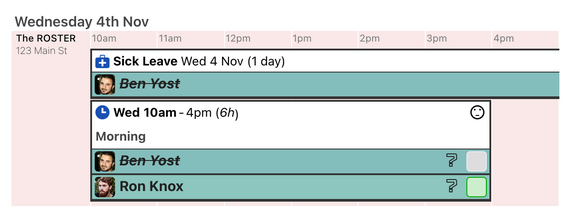
Add sick leave for the days or hours someone is off. If they are still assigned to a shift in that time, their name on the shift is struck through, and hovering over it names the clash. You can see which shifts need someone else before they start short-staffed.
When you open the shift to assign cover, the person off sick is struck through on the list too, so you don't pick them by mistake. If you prefer, WorkRoster can block clashing assignments altogether.
Days or hours, the same as holiday
Each employee's sick leave is counted in days or in hours, using the same setting as their holiday. For staff counted in hours, record the start and end time, so a few hours off count as the hours they missed. For staff counted in days, you can set the days off yourself, down to a quarter of a day.
Add sick leave as a draft when you first hear, and confirm it once you know how long they'll be off.
Sick leave reports
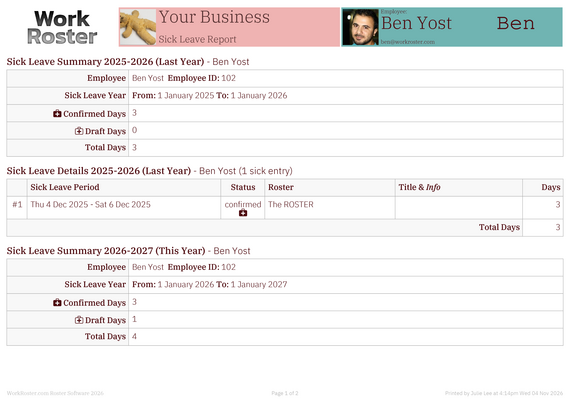
The Sick Leave Report PDF starts with a summary for each person: their confirmed, draft and total days or hours for the year. It then lists every absence, with its dates, status and length.
Choose last year, this year or next year, or all years at once. The years start on the date you set for allowances, so if your year starts in April, so do the reports. Print it for everyone, with a page per employee, or for one person before a return-to-work meeting. Staff can print their own report, which shows only their own sick leave.
Managers can also export sick leave as a CSV file for a spreadsheet or payroll.
Who sees it, and who hears about it
- Only managers add sick leave. The employee sees it on their own schedule in the app and in their calendar feed.
- Choose whether staff can see each other's sick leave, or only their own. Only their own is the default.
- Managers get an email and an app notification when sick leave is added, changed or removed, unless they made the change themselves. Each manager can turn these off.
- Staff can turn on emails or app notifications about their own sick leave.
Common questions
Can staff report themselves sick in the app?
No. A manager adds the sick leave, usually when the person calls in, and it then appears on that person's schedule.
Is there a sick leave allowance?
No. WorkRoster records the sick leave taken and totals it for each year, but it does not count it down from an allowance as it does for holiday.
Does sick leave show on printed rosters?
Yes, unless you leave it out when you print. You can also filter the roster to show sick leave only.
21 days free. No card needed.