
21 days free. No card needed.
Shift Calendar Feeds for Google, Apple and Outlook
Staff who run their week from their phone's calendar don't want to check a second app to see when they're working. A calendar feed puts their WorkRoster shifts into Google Calendar, Apple Calendar or Outlook, next to everything else, and keeps them up to date.
Works with the calendar you use
- Google Calendar
- Apple Calendar on iPhone, iPad and Mac
- Outlook
- any other calendar that can subscribe to an iCal (ICS) feed
For Google Calendar there is an Add to Google Calendar button on the Calendar Feeds page. For other calendars, subscribe to your feed link, which is also in the app's menu.
What each shift shows
Each shift shows the roster and shift name, its start and end times, and your workforce as the location. The details include the shift's notes, its break, whether it is confirmed, and who else is working it if your workforce lets you see that. Holiday and sick leave appear too.
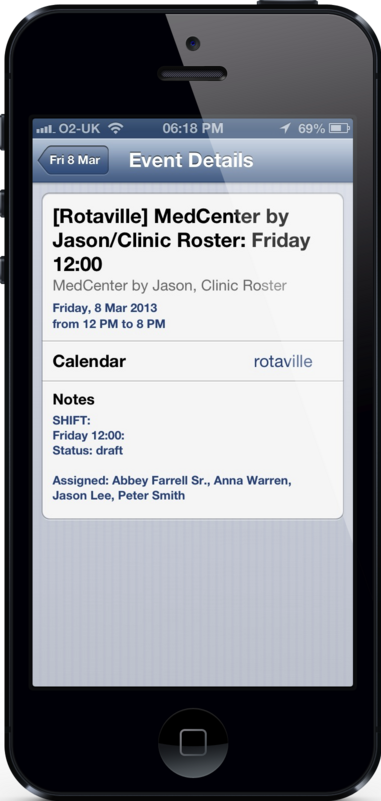
Kept up to date
Your feed covers up to 100 shifts over the next 200 days and changes as the roster changes. Google Calendar refreshes subscribed calendars about once a day; most other calendars refresh more often.
For managers
Managers can also subscribe to a feed of a whole workforce or a single roster, to see every shift in their own calendar.
Private links
Each feed link is private to you. If one is shared by mistake, reset your links on the Calendar Feeds page, and old subscriptions stop working.
Common questions
Why hasn't a change shown up in Google Calendar yet?
Google refreshes subscribed calendars about once a day, so a change can take up to a day to appear. The app and the website always show the latest roster.
Do I need the app to use a calendar feed?
No. Copy your feed link from the Calendar Feeds page on the website and add it to your calendar.
Can other people see my calendar feed?
Only someone who has your private link. Reset it at any time to stop an old link working.
The calendar feeds video shows where to find your links.
21 days free. No card needed.