
21 days free. No card needed.
Shift Agreements: Staff Accept or Decline
A new roster on the wall or in a group chat tells you nothing about who has read it. With shift agreements, staff accept each shift you give them, so you can see who has seen their shifts and follow up with the ones who haven't.
Accept, or decline if you allow it
Staff accept their upcoming shifts from their home page, the roster, the app or the mobile site. The roster marks each assignment as accepted, declined or not answered yet.
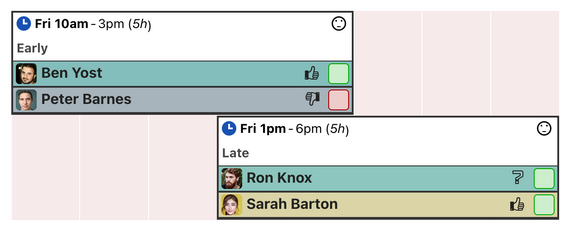
You decide whether staff can decline at all, and how late: at any time, only while a shift is still a draft, or up to 1, 2, 3, 7, 14, 30, 60 or 90 days before it starts.
Shift interest
Before you assign a shift, staff can mark open shifts they would be willing, or reluctant, to work. You see their interest next to their name on the assignment menu, which helps you fill the shift with someone who wants it.
Your rules
- Let staff see each other's agreements, or keep them for managers. Seeing colleagues accept their shifts often prompts others to do the same.
- Turn shift agreements or shift interest off in the workforce settings if you don't use them.
Common questions
If someone declines a shift, are they off it?
No. A decline tells you there is a problem, and the shift stays assigned until you change it. Staff should talk to you about it as well.
Can I stop last-minute declines?
Yes. Allow declines only up to a set number of days before the shift, or only while it is a draft.
Can staff accept shifts on their phone?
Yes, in the iPhone and Android apps and on the mobile site.
Watch the shift agreements and shift interest videos, or see how they show on the roster.
21 days free. No card needed.