
21 days free. No card needed.
Staff Availability on the Roster
Part-time staff, students and people with second jobs can't work every shift, and asking each of them before you build the roster takes a round of texts. With availability, staff mark when they can and can't work, and you see it as you assign shifts.
For staff
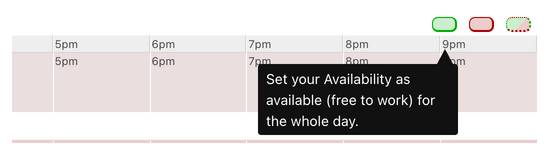
On the weekly roster, staff mark a whole day as free (green) or busy (red), or set it hour by hour when the day is mixed. From the month view they can mark whole weeks, and they can add a reason. Availability can be updated in the app, on the mobile site or on the website, at any time.
For managers
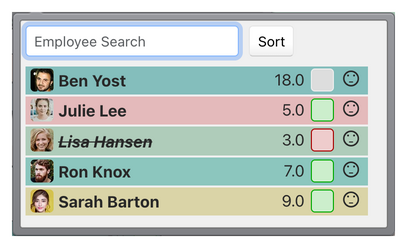
When you assign a shift, the assignment menu shows each person's availability for that time: green when they are free, red when they are busy, striped when it is mixed, and grey when they haven't said.
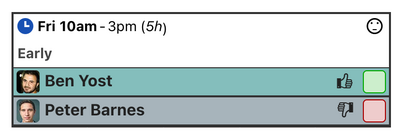
The same colours show next to everyone already on a shift, so you can spot a clash after the roster is built. You can also show availability rows on the roster, for yourself, for everyone who has set some, or for all staff.
WorkRoster is great - all my staff love it, it saves everyone so much time in communicating their availability. I have staff who are begging their other jobs to get the same!

Siobhan Lawson
Founder & Managing Director
RollerStop Roller Disco
Your rules
- Let staff see each other's availability, or only their own. Managers always see everyone's.
- Turn availability off in the workforce settings if everyone works full time and you don't need it.
- Availability is a guide for whoever builds the roster, and you can still assign someone who is busy. To check that staff have seen the shifts you give them, use shift agreements.
Common questions
Can staff set their availability weeks ahead?
Yes. They can mark whole weeks from the month view, and change it whenever their plans change.
Can staff see when their colleagues are free?
Only if you allow it. Choose whether staff see everyone's availability or only their own.
Do we have to use availability?
No. Turn it off in the workforce settings and the free and busy controls disappear from the roster.
Watch the availability video, or read availability for managers.
21 days free. No card needed.