
21 days free. No card needed.
Staff Memos with Read Receipts
Some messages have to reach everyone and stay put: a new policy, a uniform change, the opening hours over Christmas. In a group chat they scroll out of sight. A memo goes to each person's WorkRoster inbox, stays there until it expires or is deleted, and shows you who has opened it.
Who gets it
Send a memo to:
- all current employees, managers included
- all current and future employees, so new starters get it when they join
- employees you choose
- all current managers, current and future managers, or managers you choose
Staff can send memos too. You decide whether they can send them to everyone or only to managers.
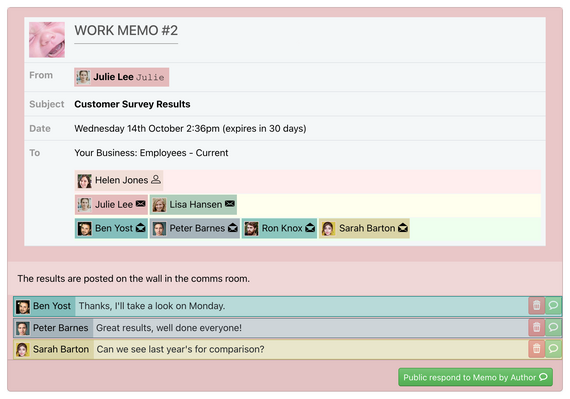
See who has read it
Each memo shows exactly who has opened it and who hasn't, so "I didn't get the message" is easy to check.

Replies
Allow short replies to a memo or not. Replies can be private between each person and the sender, or visible to everyone the memo went to.

Delivery and expiry
A memo appears in each person's inbox and on their home page. Staff get an email about each new memo, and a notification if they use the iPhone or Android app; both can be turned off in their settings.
Set an expiry period and the memo is deleted automatically, or delete it yourself and it leaves everyone's inbox straight away. Only the sender or a manager can delete a memo. To put one on the noticeboard, print it from your browser.
Common questions
Should I use a memo or chat?
Use a memo for information everyone must read and that should stay available, with a record of who has read it. Use team chat for quick conversations and shift swaps.
Will new starters see a memo I send today?
Yes, if you send it to current and future employees.
Can staff reply?
Yes, when you allow replies on that memo.
Watch the memo video to see a memo sent from start to finish.
21 days free. No card needed.